How to customize file upload button styles using css?
When you put a form on your own website, the upload button should look like your other buttons. Google Forms keeps its own look for the file upload button and has no place for your own styles, and an embedded Google Form sits in an iframe your site's CSS can't reach. With Formfacade, you write CSS for the addfile class in the Advanced tab of the form's settings: background, border, font and color. The upload button on your form changes to match, and the responses still go to your Google Form.
Let's start. Create your form and follow the steps below.
How to write the custom css?
- On the page that opens, name your form, click Create form and click Proceed.
- If it asks "Do you want to preview this form?", click No.

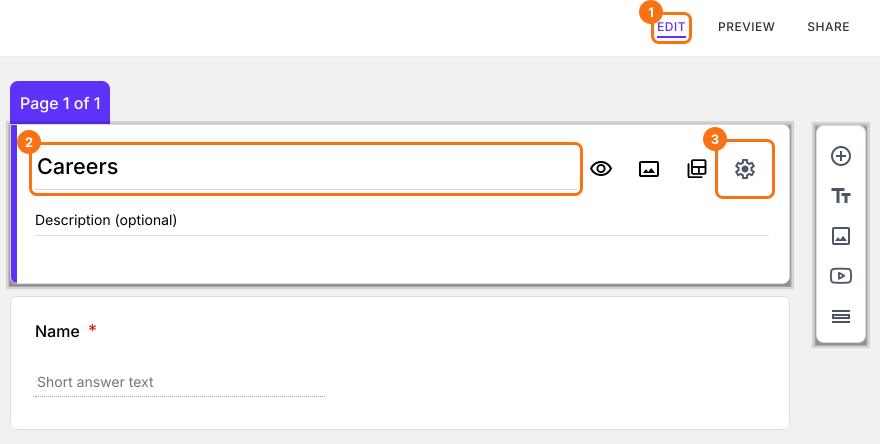
- In the Edit page, click on the form title, then click on the gear icon.
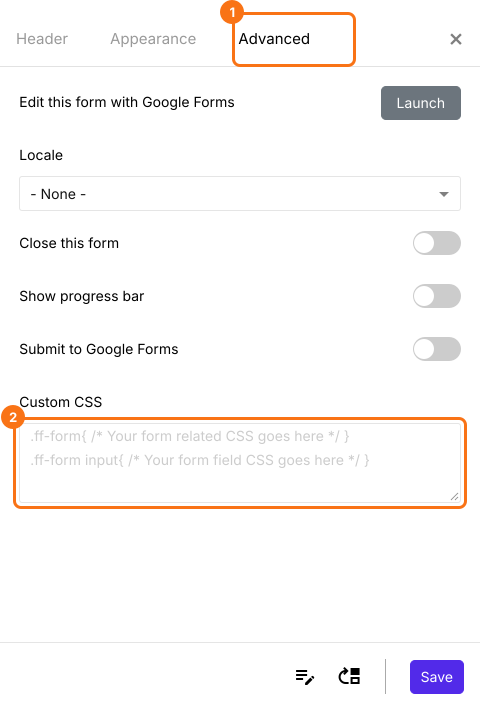
- Select the advanced tab and add the custom CSS.
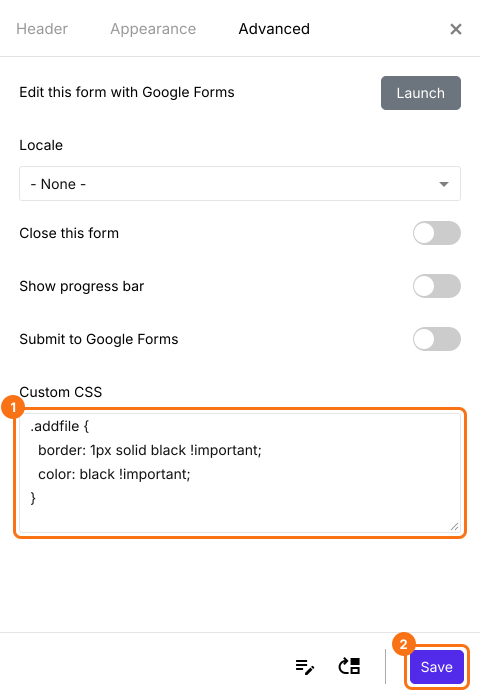
- You can change the background color, border, font, font color etc by applying the css styles to the "addfile" class as shown below and click on the Save button.
The upload button on your form changes to your styles.
Summary
Google Forms has no place to restyle its upload button, so it stands out on your website. With Formfacade, you write CSS for the addfile class in the form's Advanced settings and the button takes your styles. Create your form and complete the steps above. If you have any questions, write to support.
Last updated: