Show consent screen

You collect agreements or waivers in Google Forms and want people to read what they are agreeing to before they submit. A Google Form can ask them to tick a box, but it submits straight away without showing them their answers. People can agree without reviewing and later you have no clear step to point to. The Formesign - Signature for Google Docs addon adds a consent screen before submit. It shows the person's answers, or your own wording from a Google Doc, and the form only submits when they click Agree.
Let's start. Open your form in Google Forms, then pick one of the two ways to set up the consent screen.
You can use the Formesign Editor to display a consent screen before the user submits the form. When this option is enabled, users will have to click on the Agree button to submit their response. The Show consent screen option allows you to create a clickwrap agreement. You have two options:
- Automatically generate a consent screen with the response summary
- Use Google Docs as a template to create a custom consent screen
Automatically show the response summary
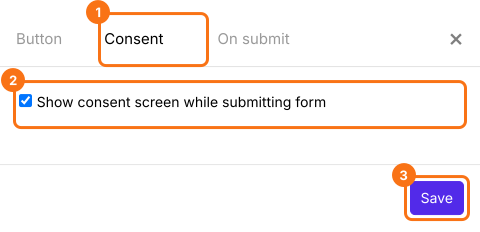
The first time, install the Formesign - Signature for Google Docs addon. Open your form in Google Forms > click on the addon icon > click Formesign - Signature for Google Docs > click More options ... > click Proceed, if it asks how to proceed. Then log in to Formesign > in the Forms dashboard, click on the form to open it > on the Edit page, click on the Submit setting gear icon in the After page row at the end of the form > click Consent > check the show consent screen option and click Save to display the response summary in the consent screen shown before submit.
Use Google Docs as template
You can use the Google Docs as a template to create a custom consent screen. Click here to learn more.
Summary
If you need people to agree before they submit, a Google Form only offers a tick box. With Formesign, you enable the consent screen in the Submit setting panel and users have to click on the Agree button to submit their response. Open your form in Google Forms and complete the steps above. If you have any questions, write to support.
Last updated: