Formfacade form redirects to Google Forms page on submit. How can I fix this?
You put your form on your website so visitors stay there, but after they submit they land on a Google Forms page, sometimes with an error or a sign-in message. It happens when your Google Form sends responders a copy of their response or limits people to 1 response, because Google has to finish those itself. To fix it, turn both settings off in your Google Form.
If you have enabled "Send responders a copy of their response" for all form submissions (Always) or limited the form submissions to 1 response per user, then the Formfacade form redirects to Google Forms page on submit. Turn these options off so that people stay on your page after they submit. You can use our Formfacade - Email notification addon to send response receipts to form respondents and email notifications to collaborators.
Redirects to Google Forms page with the message "There was a problem submitting your response."
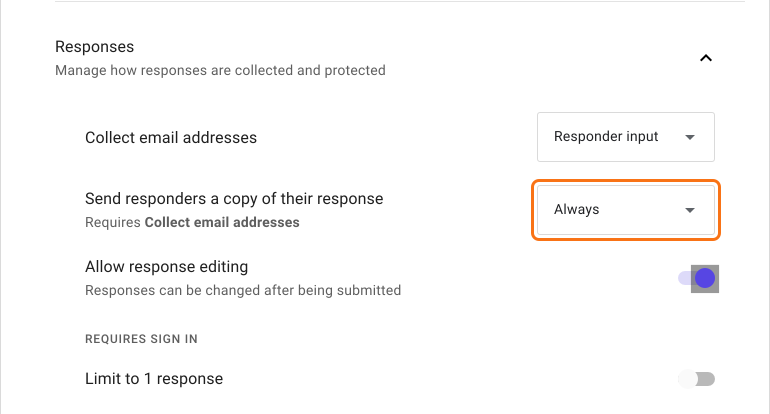
If you have enabled "Send responders a copy of their response" for all form submissions (Always), then the Formfacade form redirects to Google Forms page with the error message "There was a problem submitting your response. Try again."
To fix this, open your form in Google Forms and click on the Settings tab. Select Responses and set "Send responders a copy of their response" to Off.
How to send response receipts?
You can use our Formfacade - Email notification addon for Google Forms. Please refer to the help articles:
Redirects to Google Forms page with the message "To fill out this form, you must be signed in."
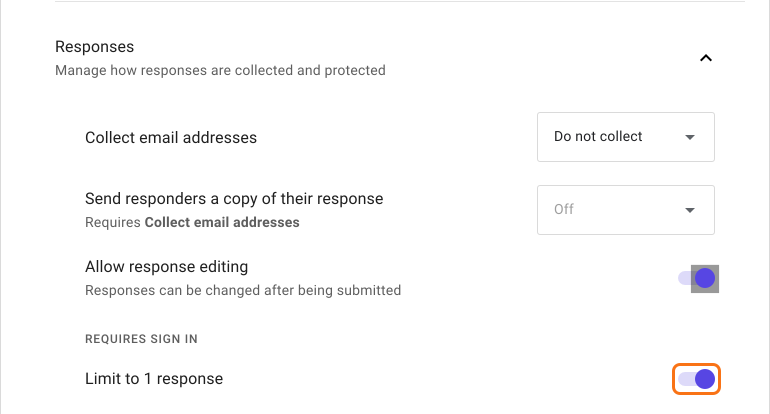
If you have limited the form submissions to 1 response per user, then the Formfacade form redirects to Google Forms page with the message "Sign in to continue. To fill out this form, you must be signed in." If the user has already signed in with their gmail account in their browser, it goes to the Google Forms page without any message.
To fix this, open your form in Google Forms and click on the Settings tab. Select Responses and turn off "Limit to 1 response".
Summary
If your Formfacade form goes to a Google Forms page on submit, the cause is one of two settings in your Google Form. Please turn these settings off and you can use the Formfacade - Email notification addon to send response receipts and email notifications instead. If you have any questions, write to support.
Last updated: