How to assign varying points for each question & calculate the total score?
"I can't seem to find a way to give different points per each questions."- Google Docs Editors Community
Some questions should weigh more than others. In an activity questionnaire, a job with heavy lifting tells you more than the hours spent sitting, so the same answer choice can't be worth the same on every question. A Google Forms quiz can set points per question, but only for one correct answer, so the weights end up in a spreadsheet. With Formfacade, you write a SCORE function for each question with its own points, SCORE(entry#id, 5, 10, 15, 20, 25) for the heaviest one, and add them together in the Score question. The weighted total is worked out as people answer, and you can email each person their total.
Let's start. Create your form and follow the steps below.
How to assign different points using SCORE - QUESTION function?
- On the page that opens, name your form, click Create form and click Proceed.

- In the Assign points dialog, AI score setup is picked under "How do you want to set up scoring?". Click Proceed.
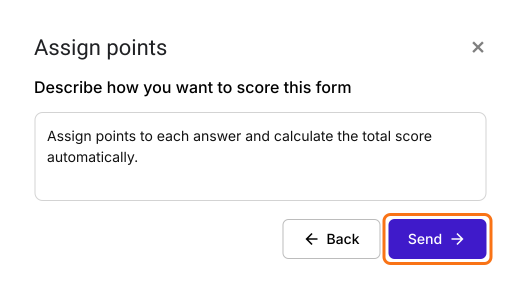
- "Describe how you want to score this form" is filled in. Click Send and click Next.
- Click the × on "You're all set" to go back to the "Edit" tab.
Let's change this form into a simple questionnaire with 3 multiple choice questions with five answer choices each (see below).
Q1. How much time do you spend sitting each day?
- Watching TV, Playing computer games etc
- (a) 5+ hrs
- (b) 4 to 5 hrs
- (c) 3 to 4 hrs
- (d) 2 to 3 hrs
- (e) Less than 2 hrs
Q2. How often do you do sports and recreational activities?
- Playing sports, going to gym, walking, cycling etc
- (a) Once or twice in a month
- (b) Once a week
- (c) Thrice a week
- (d) 5 days in a week
- (e) Daily
Q3. How much physical activity does your job require?
- Carrying or lifting heavy loads, construction, digging etc
- (a) Not much
- (b) A moderate amount
- (c) Average
- (d) Intense
- (e) Very intense
- Points: Assign varying points for each multiple choice question
- Q1: (a) - 1, (b) - 2, (c) - 3, (d) - 4, (e) - 5
- Q2: (a) - 2, (b) - 4, (c) - 6, (d) - 8, (e) - 10
- Q3: (a) - 5, (b) - 10, (c) - 15, (d) - 20, (e) - 25
We will calculate the total score by adding the individual points for the 3 multiple choice questions. The total score would be between 8 and 40.
- Click on each question in the Edit page and enter these questions and answer choices. Delete the questions you do not need. Your form may have many, so you can also keep its own multiple choice questions and follow the steps with those.
- Your form already has a Score question for assigning points and calculating the score, which may be named Total Score. Click on the score question, then click on the gear icon.
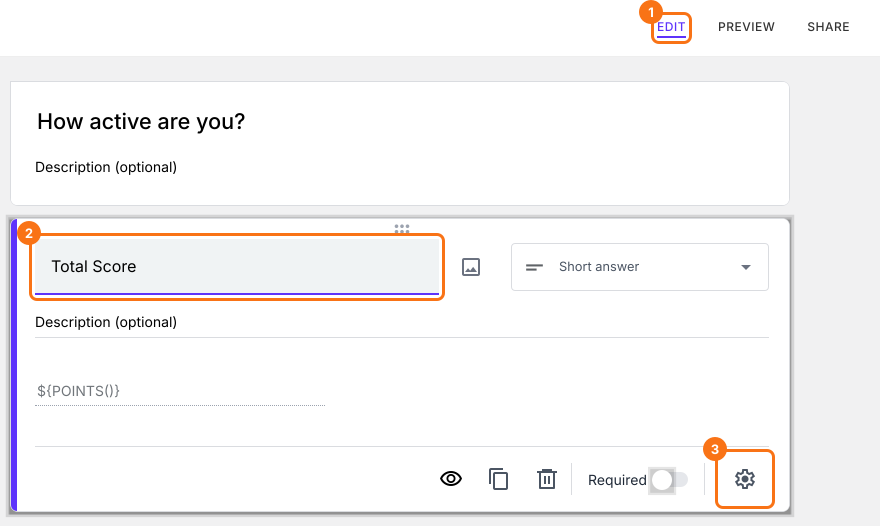
- Select "Answer" tab.
SCORE - QUESTION function
Score function can be used to assign points to answer choices in multiple choice, checkboxes and grid questions and calculate the total score.
Syntax:
SCORE(scope, point-1, point-2, …, point-n)
where
- scope - determines whether to assign points to a specific question in the form, all questions in the section, all questions in the form or only the questions that have the matching search term in the description
- point-1, point-2, … point-n - points to be assigned for different answer choices (a), (b), (c), (d), (e) etc in sequential order
In this example, we will use the entry#id for a question as the scope to assign points for that specific question and calculate the individual score for that question.
How much time do you spend sitting each day?
- (a) 5+ hrs
- (b) 4 to 5 hrs
- (c) 3 to 4 hrs
- (d) 2 to 3 hrs
- (e) Less than 2 hrs
SCORE(entry#id, 1, 2, 3, 4, 5)
- Type @ and select the required question from the list to add its entry #id in the above formula.
- 1, 2, 3, 4, 5 to assign points for answer choices (a), (b), (c), (d), (e) respectively.
How often do you do sports and recreational activities?
- (a) Once or twice in a month
- (b) Once a week
- (c) Thrice a week
- (d) 5 days in a week
- (e) Daily
SCORE(entry#id, 2, 4, 6, 8, 10)
- Type @ and select the required question from the list to add its entry #id in the above formula.
- 2, 4, 6, 8, 10 to assign points for answer choices (a), (b), (c), (d), (e) respectively.
How much physical activity does your job require? Carrying or lifting heavy loads, construction, digging etc
- (a) Not much
- (b) A moderate amount
- (c) Average
- (d) Intense
- (e) Very intense
SCORE(entry#id, 5, 10, 15, 20, 25)
- Type @ and select the required question from the list to add its entry #id in the above formula.
- 5, 10, 15, 20, 25 to assign points for answer choices (a), (b), (c), (d), (e) respectively.
To calculate the total score, add the three scores as shown in the screenshot below.
SCORE(entry#id, 1, 2, 3, 4, 5) + SCORE(entry#id, 2, 4, 6, 8, 10) + SCORE(entry#id, 5, 10, 15, 20, 25)
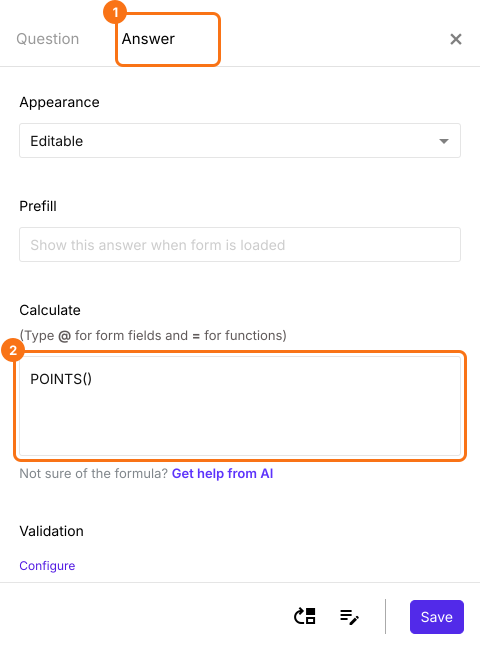
- The "Calculate" box already has POINTS(). Delete it, write the SCORE function in "Calculate" and click on the Save button.
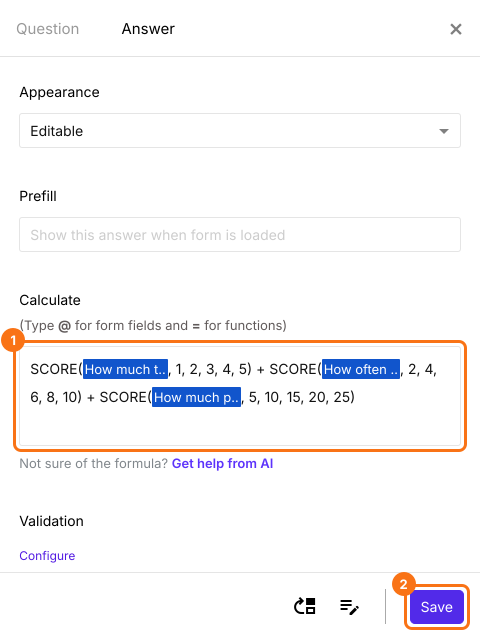
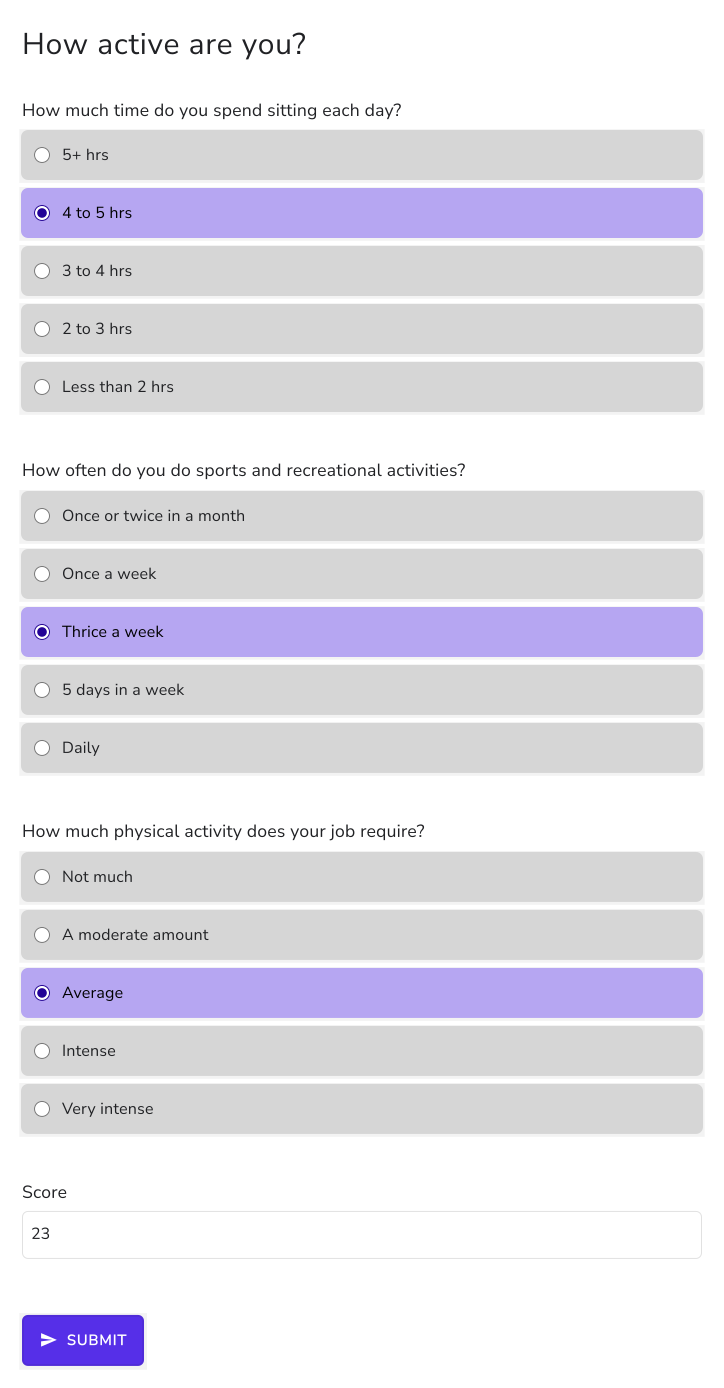
If the respondent selects answer choice (b) for Q1, answer choice (c) for Q2 and answer choice (c) for Q3, then the total score will be (2+6+15)=23.
Summary
When questions carry different weight, a Google Forms quiz can't give each answer choice its own points per question. With Formfacade, you write a SCORE function for each question and add them up in the Score question, so the total follows your weights. Create your form and complete the steps above. If you have any questions, write to support.
Last updated: