How to edit google form after submit?
"Link not reflecting updated form"- Google Docs Editors Community
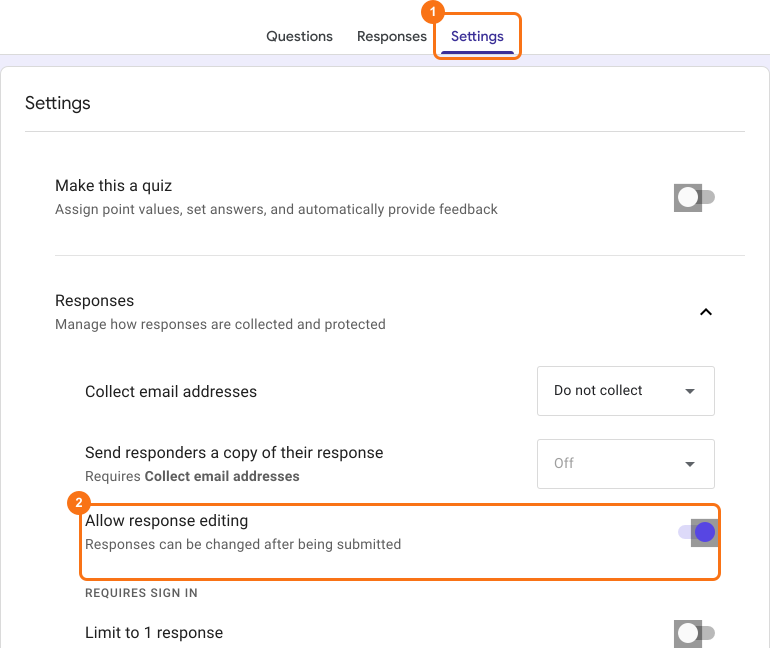
You've shared a Google Form, responses are coming in, and you find a mistake in a question, or a respondent asks to fix an answer. Before you edit, it helps to know what a change does. Form owners and collaborators can edit the form at any time and the link stays the same, but changing a question people have already answered can affect the responses you've collected. To let respondents fix their own answers, turn on Allow response editing in Google Forms.
Below is what you can change after people respond, what it affects, and how to let respondents edit their answers.
Edit google form after submission
You can edit your form anytime, even after sharing it with your users to collect responses. To make edits, open your form in Google Forms and select an existing question or answer choice to edit or add a new question, section, image, video & more. Your changes are saved as you make them, and people see them the next time they open the form.
Dynamically update google form on form submission
You can use Apps Script or add-ons from the Google Workspace Marketplace to change a Google Form when someone submits it. Two cases come up most.
Limit responses in Google Forms: You can close the google form to stop accepting responses once the max limit for the response is reached. For example, if the maximum seats for an event is 30, you can close the registration form once 30 users have registered for the event. Click here to search for add-ons that limit form responses.
Limit choices in Google Forms: You can remove, update or fill in answer choices for dropdown, multiple-choice or checkbox questions in your form on submit. This is useful for (inventory) use cases where you want to limit the number of times an answer choice can be selected. For example, you want to limit the number of bookings for a time slot or allow only booking for a time slot. Click here to search for add-ons that limit answer choices.
⚠️ Note
- If you make changes to your form, it will not affect the form link used to collect responses. The link will remain the same.
- If you make changes to existing questions and answer choices in google forms, it might affect the submitted responses already recorded in google forms. You should sync responses to Google Sheets to ensure that you don't lose any data.
Edit google form responses after submission
When Allow response editing is on in Google Forms, the confirmation message after submit and the response receipt email both have an edit link. People click it to change the response they submitted. Click here to learn more about how this works.
Summary
You can edit a Google Form at any time after sharing it and the link stays the same, but changing questions people have answered can affect their responses, so sync them to Google Sheets first. To let people change their own answers, turn on Allow response editing. If you do not have a form yet, create your form.
Last updated: