Only the help option is displayed in the Formfacade add-on menu. How can I fix this?
You open your Google Form, click the add-on icon, pick Formfacade - Embed Google Forms™ and the menu has nothing but Help. You came to embed or customize your form, the options aren't there, and it looks as if the add-on didn't install. It did. This is a Google Workspace issue: the add-on's menu doesn't load when you open it before your Google Form has finished loading. To fix it, let your Google Form load, then click the add-on icon again.
Google Workspace issue: Menu doesn't load properly; only the Help option is displayed in the menu when the Formfacade add-on is selected immediately after opening the Google Form.
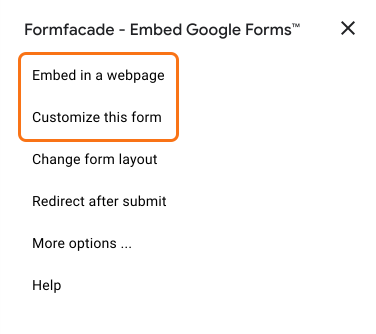
Once your Google Form has loaded, click on the add-on icon and select Formfacade - Embed Google Forms™. The menu shows Embed in a webpage and Customize this form.
Summary
If only the Help option shows in the add-on menu, it was opened before your Google Form finished loading. With the form loaded, click on the add-on icon again and Embed in a webpage and Customize this form are there. If you have any questions, write to support.
Last updated: