How to share google forms responses without edit permissions?
"Why is editor permission the only one available on some of my Google Forms?"- Google Docs Editors Community
A collaborator on a Google Form is an editor, who can change your questions and delete responses by mistake, and 30 people on Google's forum have asked why they can't pick Viewer instead. You only want your team to read the responses. The way around it in Google Forms is to send the responses to a Google Sheet and share the Sheet as Viewer or Commenter. If your form is on your website with Formfacade, you link that Sheet from Formfacade's Responses tab, or add your team as Viewers in Formfacade, who see the responses and reports and can't touch the form.
Open your form in Formfacade and follow the steps below. If you don't have one yet, create your form first.
How to sync form responses to Google Sheets?
- Open your form in Formfacade and click on "Responses" tab

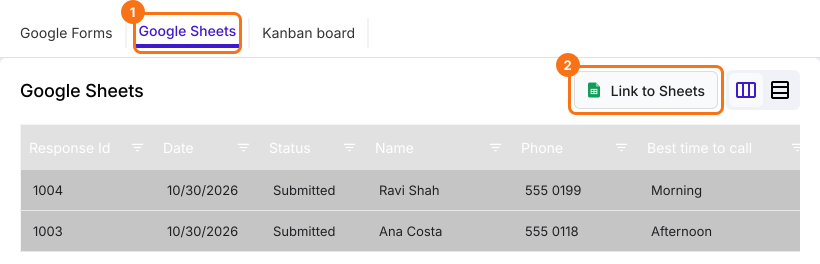
- Click Google Sheets
- Click Link to Sheets
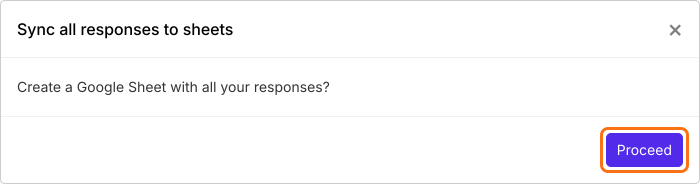
- Click Proceed on "Sync all responses to sheets"
- When your responses have synced, click View sheets to open your Google Sheet
How to share Google Sheets with read-only permissions?
Once you have synced your form responses to Google Sheets, you can use the SHARE option in Google Sheets to add collaborators and specify viewer access.
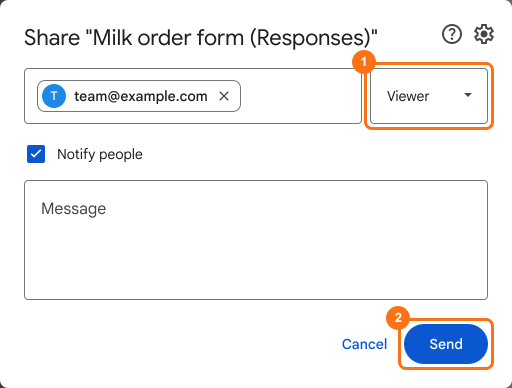
- Click Share
- Enter the email address or groups you want to share this sheet with
- Choose Viewer or Commenter access for each of them
- Click Send
You can also add your team as Viewers in Formfacade, who can view the responses & reports. Read How to share your form with collaborators?
Summary
If you add your team as collaborators in Google Forms, they can also edit questions and delete responses. With Formfacade, you sync the form responses to Google Sheets and share the sheet with Viewer or Commenter access, or add your team as Viewers in Formfacade. Create your form and complete the steps above. If you have any questions, write to support.
Last updated: