How to share your form with collaborators?
"Can't find the collaborator link to share in Google Forms since the update?"- Google Docs Editors Community
This is a common question, and 113 people on Google's forum have asked it since Google Forms moved its sharing options. Passing questions back and forth by email leaves you with different copies of one form. Google Forms adds collaborators from its Share menu, and each of them is an editor who can change your questions. With Formfacade, you add collaborators from the Share tab and they get an email invite to the same form. You can also add people as Viewers, who see the responses and reports without touching the form.
Create your form, or open one you have in Formfacade, and follow the steps below.
How to add collaborators?
- On the page that opens, name your form, click Embed form and click Proceed. You land on the Share tab. For a form you already have in Formfacade, open it and click on "Share" tab.

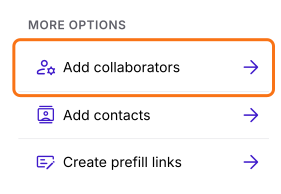
- Click Add collaborators under More options
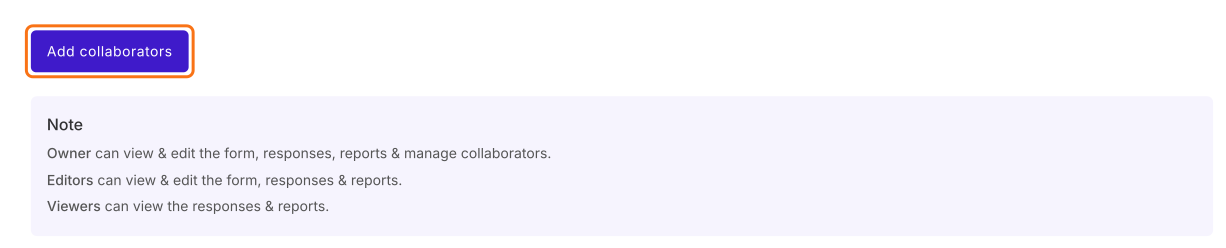
- Click Add collaborators
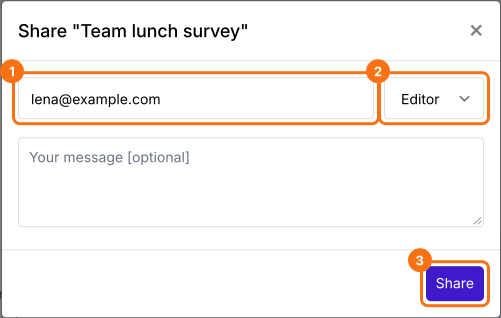
- Enter the email addresses of the collaborators
- Set the role to Editor
- You can enter the optional message
- Click on Share
The collaborators get an email with an Accept invite button and they are listed on the Collaborators page. Editors can view & edit the form, responses & reports. Viewers can view the responses & reports.
Summary
If you work on a form with other people, separate copies are hard to keep in step. With Formfacade, you click Add collaborators on the Share tab, enter the email addresses of the collaborators, set the role to Editor and click on Share. Create your form and complete the steps above.
Last updated: