How to show different questions based on answers in Google Forms?
"I am working on a Google Form and need to use Skip Logic"- Google Docs Editors Community
A survey that asks everyone every question makes some people read questions that don't apply to them, and some of them leave. Google Forms handles this with Go to section based on answer on a multiple choice or dropdown question, and it moves people between whole sections of a form that still looks like Google's. With Formfacade, you add Go to page to a multiple choice question and pick a page for each answer, so people see only the pages that fit their answers, under your branding. The responses are still collected in your Google Form.
Create your form, or open one you have in Formfacade, and follow the steps below.
Show questions based on answers
- On the page that opens, name your form, click Embed form and click Proceed. If you already have a form in Formfacade, open it instead.
- Click on "Edit" tab

Your form needs a multiple choice question and a page for each set of questions. If it does not have them, add them first. To add a page, click on the question after which it must begin and click on the Add page icon in the toolbar on the right. The questions after it move to the new page. Read How to add a question to Google Forms? and How to add sections in Google Forms?
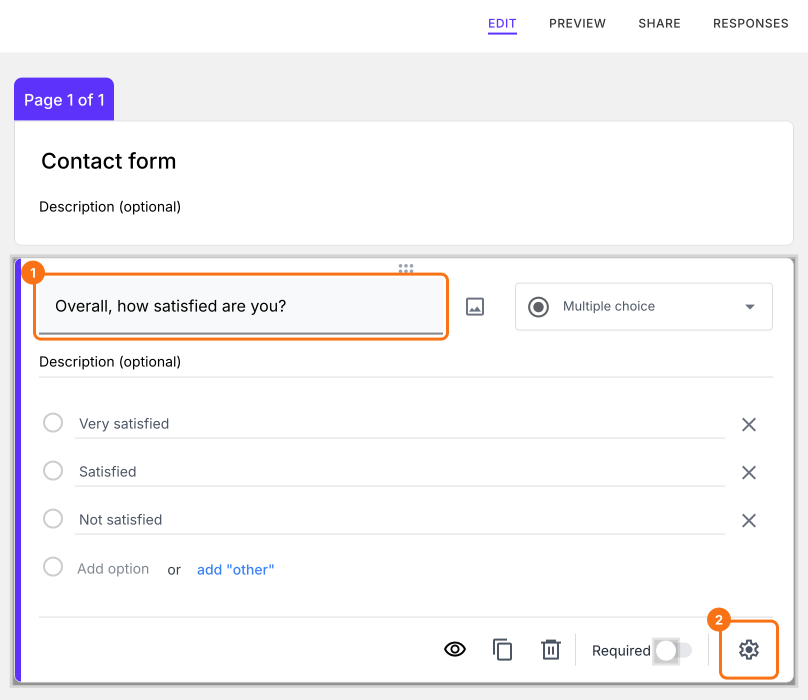
- Click on the multiple choice question
- Click on the ⚙️ icon at the bottom of the question
- Click + Go to page on the Question tab
- Select the relevant page for each answer choice: Continue to next page, Go to page 1, Go to page 2 or Submit form
- Click Save
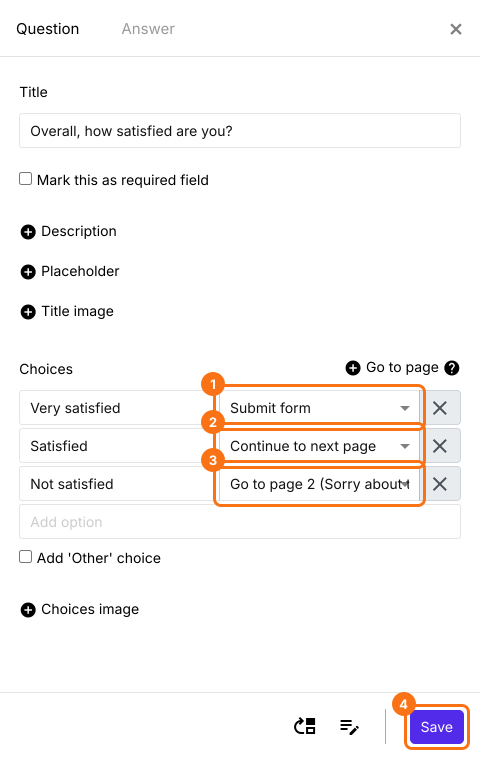
When users choose an answer and click Next, they will go to the page you selected for it and skip the others.
Summary
If everyone sees the same questions, some people have to read questions that do not apply to them. With Formfacade, you click on the multiple choice question, click on the ⚙️ icon, click + Go to page and select a page for each answer. Create your form and complete the steps above. If you have any questions, write to support.
Last updated: