How to add response validation to a question in Google Forms?
"what is best add-on suitable for Date validation in Google form?"- Google Docs Editors Community
Ask for an email address or a phone number and some people will type it wrong. You find out when you try to reach them. Google Forms checks answers with response validation on short answer, paragraph and checkbox questions, but not on a date, so it can't allow only future dates or only weekdays. With Formfacade, you add validation from the ⚙️ icon on the question, and people see your message before they can go on. A date question can also allow only past dates, only future dates or specific days of the week.
Create your form, or open one you have in Formfacade, and follow the steps below.
Add response validation to a question
- On the page that opens, name your form, click Embed form and click Proceed. If you already have a form in Formfacade, open it instead.
- Click on "Edit" tab

- Click on the question
- Click on the ⚙️ icon at the bottom of the question
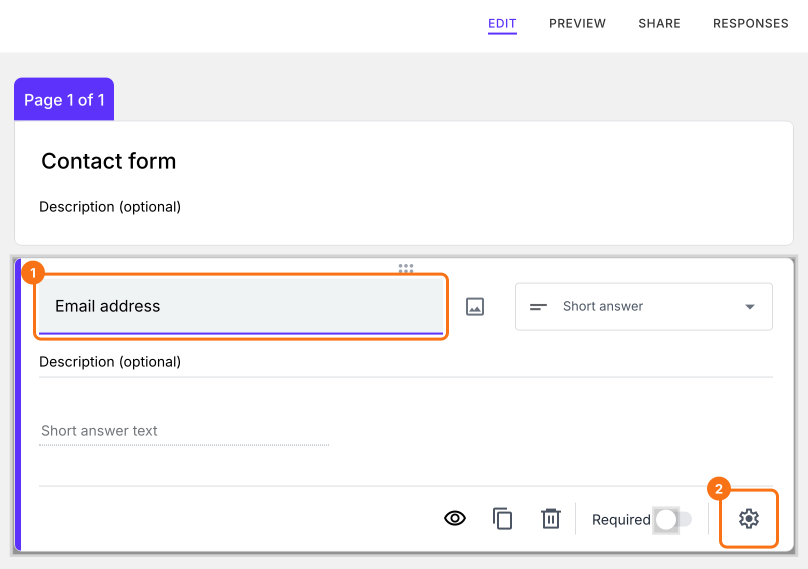
- Click on the Answer tab
- Click Configure under Validation
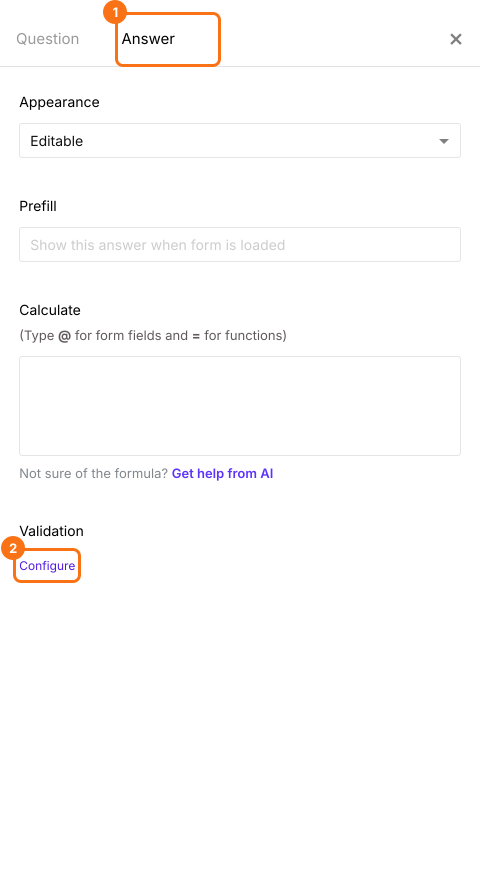
- Add the required response validation
- Click Save
For example, select Text and then Email for an email address question. This validation will check if the users are entering a valid email address format. You can enter your own message in Custom error text. When someone enters an answer that does not fit, the form shows your message and does not go on.
Response validation by question types
Short answer: You can use this question to collect names, email addresses, phone numbers, website url & more. You can set rules to get the answers you need.
Paragraph: You can use this question to allow users to write long answers with one or more paragraphs. By default, this does not have any character or word limit, but you can use the response validation option to limit responses to specified number of characters or words.
Checkboxes: You can use this question to allow users to select multiple answers from the available choices. You can add a response validation to limit the number of answer choices that users can select in a checkbox question. You can make users select at least a certain number of answers, exactly select the specified number of answers or select at most a certain number of answers.
Date: You can allow only past dates, only future dates, future dates with a lead time, dates between two dates or specific days of the week or exclude specific dates.
Multiple choice, dropdown, linear scale, grid and time questions do not have validation.
Summary
If people can type anything in an answer, you will get answers that you cannot use. With Formfacade, you click on the question, click on the ⚙️ icon, click on the Answer tab and click Configure under Validation and the form checks the answer before it is submitted. Create your form and complete the steps above.
Last updated: