How to shuffle answer choices in Google Forms?
People tend to pick answers near the top of a list, so when everyone sees the choices in the same order, your results lean that way. Google Forms can shuffle the choices of a multiple choice, checkbox or dropdown question, but the Shuffle option order setting is in the question's ⋮ menu, where it's easy to miss. If your form is on your website with Formfacade, you open it in Google Forms from Formfacade's editor and turn the setting on there. Each person then sees the choices in a different order on your form.
Create your form, or open one you have in Formfacade, and follow the steps below.
How to open your form in Google Forms?
- On the page that opens, name your form, click Embed form and click Proceed. If you already have a form in Formfacade, open it instead.
- Click on "Edit" tab

- Click on the form's title
- Click on the ⚙️ icon on the title card
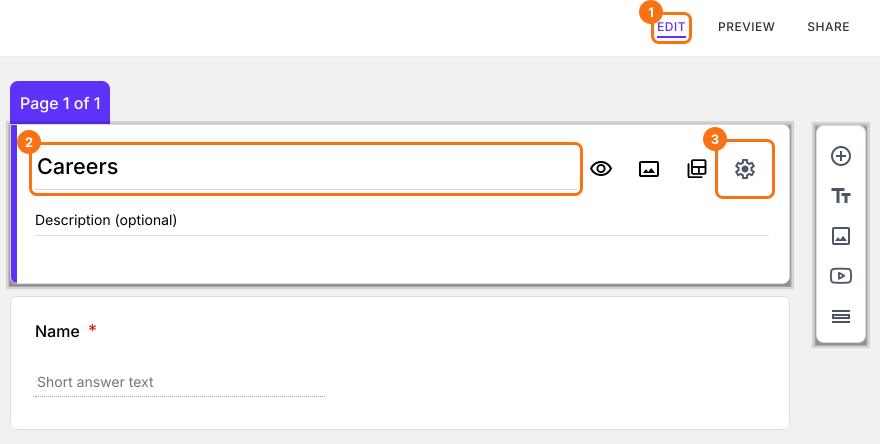
- Click on the Advanced tab
- Click Launch next to "Edit this form with Google Forms"
Dropdown, multiple choice and checkboxes question type allows you to create a question with a pre-defined set of answer choices. You can shuffle the answer choices to eliminate the order bias and improve the quality of survey responses.
Randomize the answer choices
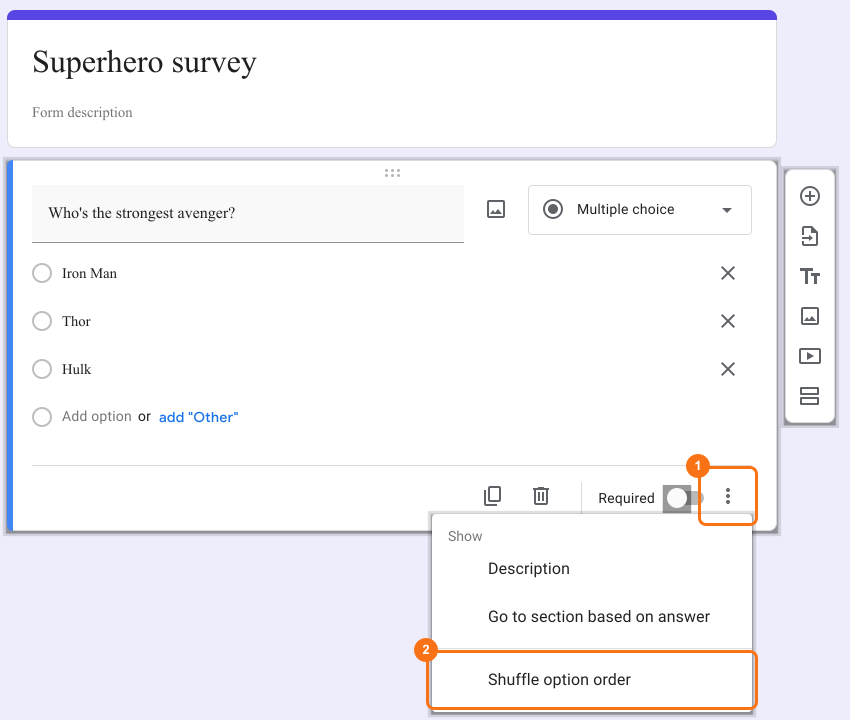
- Select a multiple choice, dropdown or checkboxes question in Google Forms. If your form has none, change a question's type in the list at its top right first.
- Click on ⋮ More icon
- Select Shuffle option order as shown below
Your change reaches your form when you open the "Edit" tab in Formfacade again, or reload it if it is already open. Formfacade reads your Google Form again each time you open it there.
Summary
If everyone sees the answer choices in the same order, your survey results can be biased. With Formfacade, you open your form in Google Forms with Launch, select a question, click on ⋮ More icon and select Shuffle option order and the choices no longer appear in the same order for everyone. Create your form and complete the steps above. If you have any questions, write to support.
Last updated: