Form is no longer accepting responses. How can I fix this?
"google form not accepting responses"- Google Docs Editors Community
Your form was taking responses on your website, and now it says it is no longer accepting them. Your users can't open it or send a response, and nothing on the form says why, because the switch that closes it is in Google Forms and not on the form. To fix it, turn Accepting responses back on in your Google Form.
If you have disabled "Accepting responses", your users will no longer be able to view your form and submit the response. Please enable this option to get the form working and then use it with Formfacade.
To fix this issue, open your Google Form, click on the "Published" button, enable the "Accepting responses" toggle button to start accepting responses and click on Save. You will then be able to use the Formfacade add-on with your Google Form.
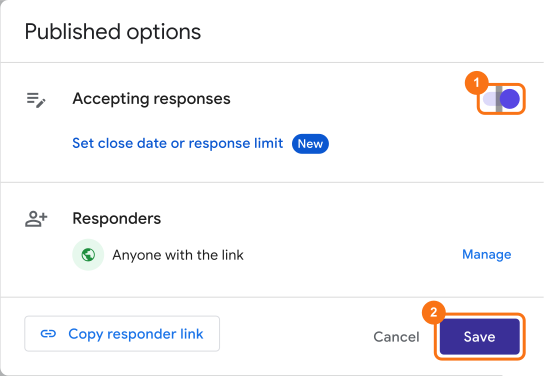
If the message mentions a file upload limit or your Drive storage, the toggle is not the cause: the form stops when the files people upload reach that limit. Read How to save Google Forms uploads without using your Drive storage?
Summary
If your form is no longer accepting responses, your users cannot view it or submit it. With the Published options in Google Forms, you can enable Accepting responses and then use your form with Formfacade. If you have any questions, write to support.
Last updated: