Is there a way to change the button color or font styles in the form?
Your form sits on your website, and its Submit button and fonts should look like the rest of your pages. Google Forms lets you pick fonts and a theme color, but that one color is used for the header, the buttons and the highlights together, so the button can't have a color of its own. Embedding the form doesn't help, because the form loads in an iframe and your site's styles can't reach inside it. With Formfacade, you set the button color and the fonts in the THEME tab, and the form shows on your page without an iframe.
Below are two ways to change the button color and fonts, and where each one falls short.
2 ways to change the button color and fonts
1. Customize the theme in Google Forms
In Google Forms, click the palette icon to customize the theme. Choose a font for the header, the questions and the text, and pick a theme color.
Where it falls short: the one theme color is used for the header, the buttons and the highlights together, so the button can't have a color of its own. If you embed the form on your website, your site's styles can't reach inside the iframe.
2. Change the button color and fonts with Formfacade
- Click on Create your form, name your form, click Build form and click Proceed.
- Click on the "Preview" tab

- Click on the "THEME" tab in the preview settings
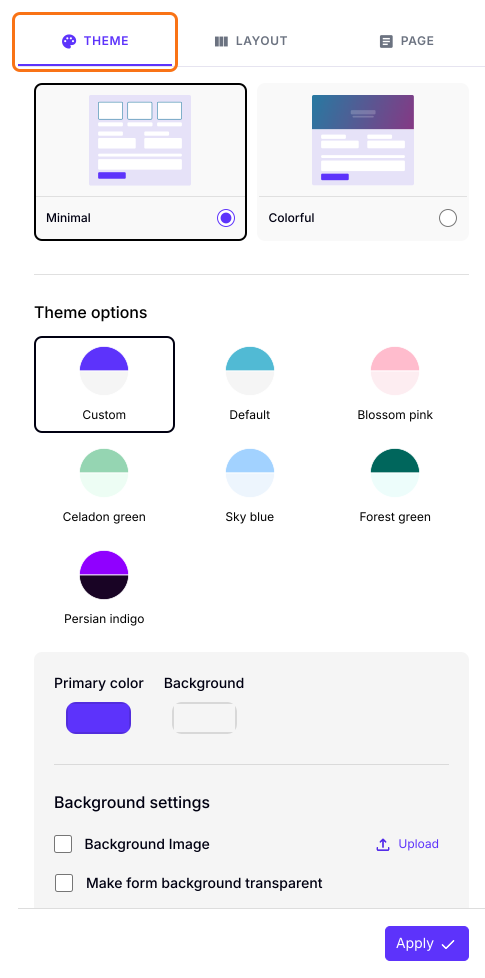
- Update the Primary color to change the button color
- Scroll down to Typography settings to update the fonts.
- Click on the "Apply to all forms" button, which changes the color and font on every live form on your account, not only this one.
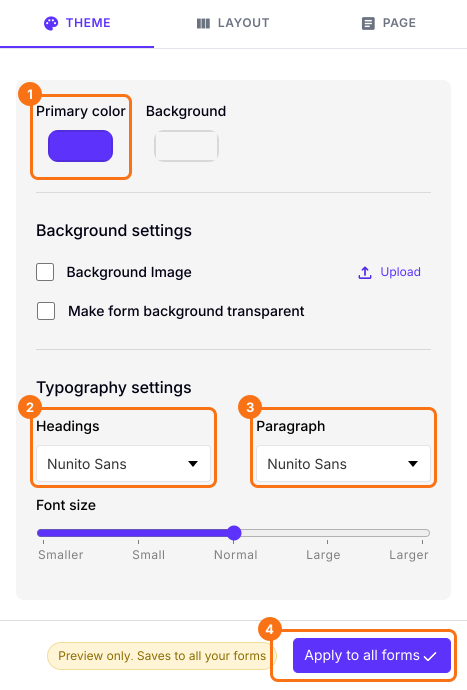
Your form will show the new button color and fonts.
Summary
Google Forms uses one theme color for the header, the buttons and the highlights, and your website's styles can't reach a form in an iframe. With Formfacade, you set the button color and the fonts in the THEME tab. Apply to all forms changes every live form on your account. Create your form and complete the steps above.
Last updated: