How to delete all responses from google forms?
"Unable to delete all responses from Google Form"- Google Docs Editors Community
156 people on Google's forum have asked how to delete every response in a Google Form at once. Until you do, test answers and old entries stay in your summary charts and your totals. Google Forms has a Delete all responses option, but it sits in the More menu on the Responses tab, and it can't be undone. It also leaves a linked Google Sheet as it is, so you delete the old rows there too, or link a new Sheet. If your form is on your website with Formfacade, you reach the same option from Formfacade's Responses tab.
Open your form in Formfacade and follow the steps below. If you don't have one yet, create your form first.
How to delete all the responses?
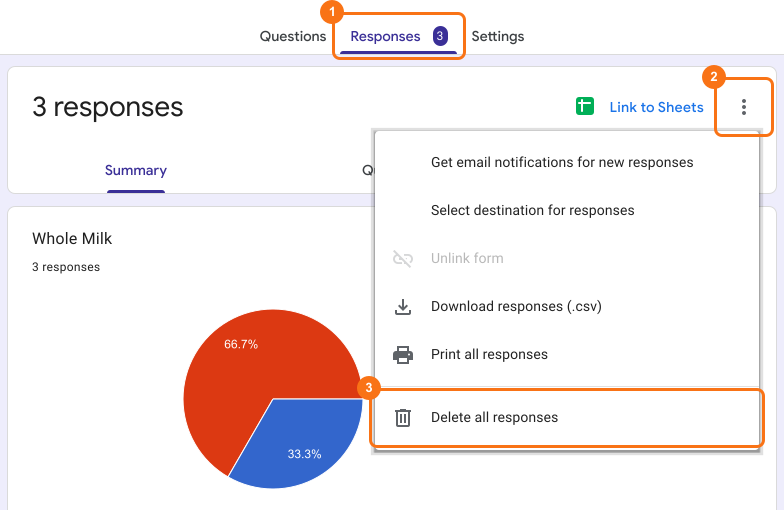
- Open your form in Formfacade and click on "Responses" tab

- If you see Submit to Google Forms, click it and click Proceed, so that responses from your form reach Google Forms. Only the responses submitted after that reach it.

- Click View in Google Forms. Your form's responses open in Google Forms

- Click More ⋮ icon
- Click Delete all responses
- Click OK to delete all the form responses.
⚠️ Important
- Google Forms does not have version history like Google Docs or Sheets. When you delete responses in Google Forms, it will be deleted permanently. Deleted responses cannot be restored later.
- Deleting responses from Google Forms will not automatically delete the responses synced to Google Sheets. You can manually delete it in sheets or unlink the form & create a new sheet.
Summary
Old and test responses stay in your charts and totals until you delete them, and deleting them one by one takes too long. With Formfacade, you click Responses, View in Google Forms, More ⋮ and Delete all responses. Google Forms can't restore them later, so link a Google Sheet first if you need a copy. Create your form and complete the steps above. If you have any questions, write to support.
Last updated: