How to delete a response from google forms?
"Can I delete one person's response without deleting them all?"- Google Docs Editors Community
Someone submits your form twice, or a test answer gets in, and that one response is counted in your summary charts and your totals. 27 people on Google's forum have asked how to remove one response without losing the rest. Google Forms can delete a single response from the Individual view of its Responses tab, but the tab opens on the summary, so you first have to find that response. If your form is on your website with Formfacade, you open the same view from Formfacade's Responses tab and delete just that one. A Google Sheet linked to the form keeps its copy.
Open your form in Formfacade and follow the steps below. If you don't have one yet, create your form first.
How to delete a response?
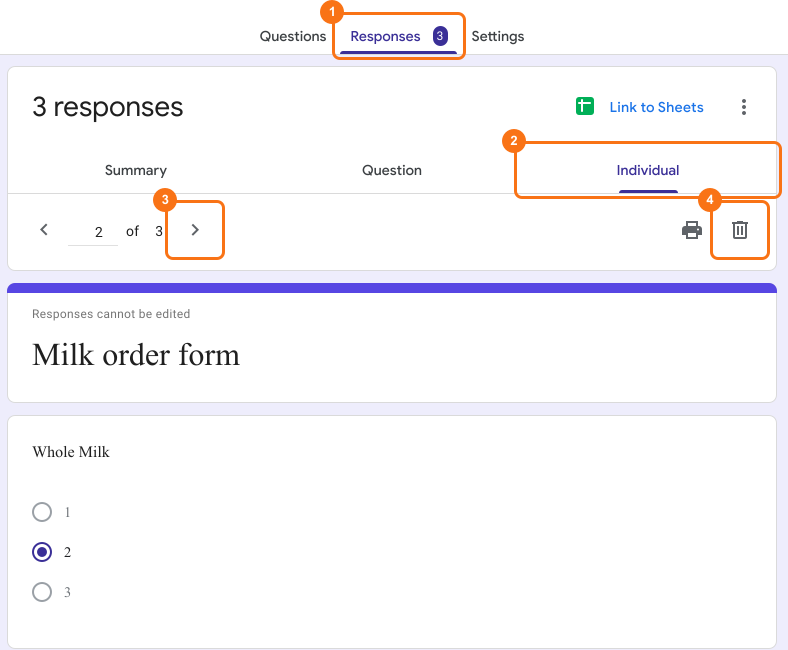
- Open your form in Formfacade and click on "Responses" tab

- If you see Submit to Google Forms, click it and click Proceed, so that responses from your form reach Google Forms. Only the responses submitted after that reach it.

- Click View in Google Forms. Your form's responses open in Google Forms

- Click Individual
- Click previous or next icon to view the response you want to delete
- Click delete icon
- Click YES to delete the selected form response.
⚠️ Important
- Google Forms does not have version history like Google Docs or Sheets. When you delete responses in Google Forms, it will be deleted permanently. Deleted responses cannot be restored later.
- Deleting responses from Google Forms will not automatically delete the responses synced to Google Sheets. You can manually delete it in sheets or unlink the form & create a new sheet.
Summary
If one wrong or repeated response is counted with the others, your totals are off. With Formfacade, you click Responses, View in Google Forms and Individual, go to that response with the previous or next icon and click the delete icon. It can't be restored later. Create your form and complete the steps above. If you have any questions, write to support.
Last updated: