How to download google forms responses?
You want your Google Forms responses in Excel or another tool, to sort, total or send them on. Copying answers off the Responses tab one at a time is slow and easy to get wrong. Google Forms downloads every response as a .csv file from the More menu, but that file is out of date by the next response. If your form is on your website with Formfacade, you reach the same download from Formfacade's Responses tab. For a copy that keeps up, link the responses to a Google Sheet instead.
Open your form in Formfacade and follow the steps below. If you don't have one yet, create your form first.
How to download the responses?
- Open your form in Formfacade and click on "Responses" tab

- If you see Submit to Google Forms, click it and click Proceed, so that responses from your form reach Google Forms. Only the responses submitted after that reach it.

- Click View in Google Forms. Your form's responses open in Google Forms

- Click More ⋮ icon
- Click Download responses (.csv)
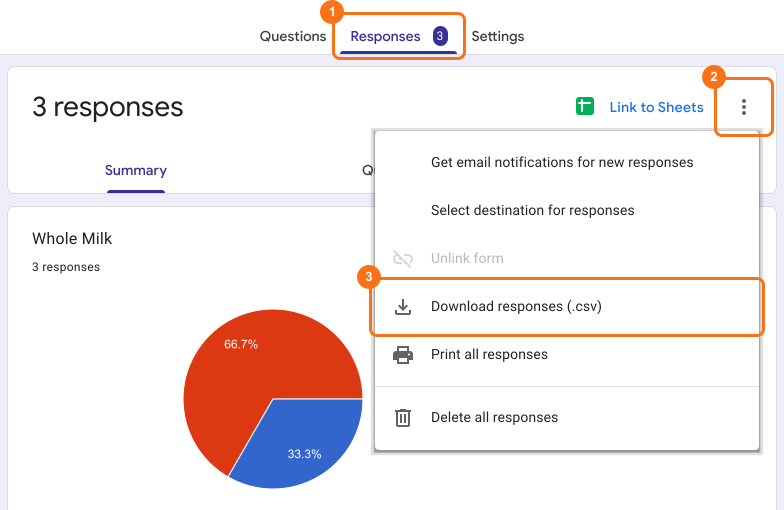
You get all the responses as a .csv file.
Summary
If you need your responses outside Google Forms, copying them by hand is slow. With Formfacade, you click Responses, View in Google Forms, More ⋮ and Download responses (.csv), and you get all the responses as a .csv file. Create your form and complete the steps above. If you have any questions, write to support.
Last updated: