How to view individual responses in google forms?
"How can I view and sort Google Form responses by the individual?"- Google Docs Editors Community
To read everything one person submitted, the summary is no help: it mixes their answers with everyone else's, question by question. Google Forms has an Individual view on its Responses tab, but it steps through responses one at a time with previous and next, so finding one person in a long list is slow. If your form is on your website with Formfacade, you open the same view from Formfacade's Responses tab. Each response is also a card on Formfacade's Kanban board, where you click the person you want.
Open your form in Formfacade and follow the steps below. If you don't have one yet, create your form first.
How to view individual responses?
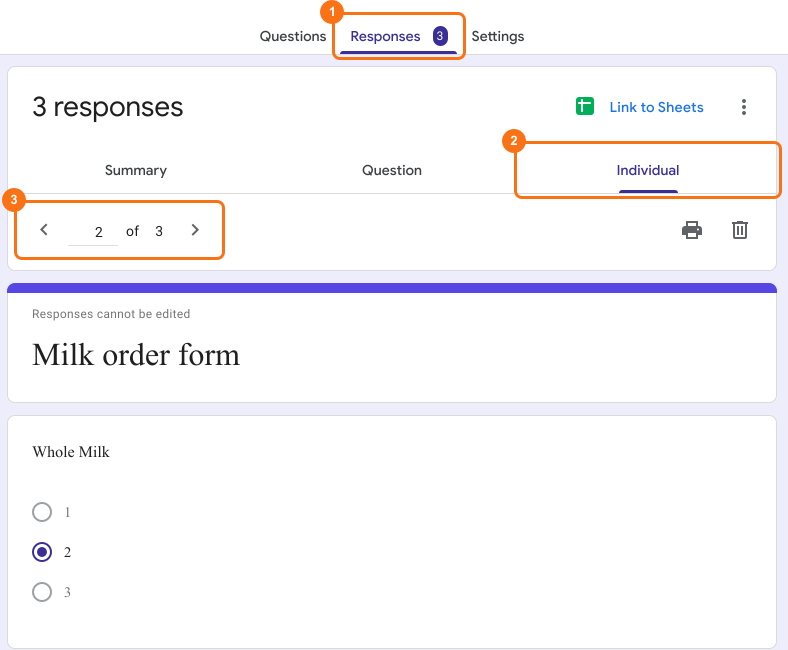
- Open your form in Formfacade and click on "Responses" tab

- If you see Submit to Google Forms, click it and click Proceed, so that responses from your form reach Google Forms. Only the responses submitted after that reach it.

- Click View in Google Forms. Your form's responses open in Google Forms

- Click Individual to view form responses by form respondent
- Use the previous and next icons to go between individual responses.
Summary
If you need all the answers from one person, the summary won't show them together. With Formfacade, you click Responses, View in Google Forms and Individual, and use the previous and next icons to go from one response to the next. Create your form and complete the steps above. If you have any questions, write to support.
Last updated: