How to delete uploaded files in Formfacade?
Resumes, IDs and other private documents shouldn't sit around after you're done with them. In Google Forms, uploads stay in your Drive and deleting a response doesn't delete its files, so you hunt each one down in the upload folder. With Formfacade, you move the response to Trash from the RESPONSES tab and say Yes to deleting its attachments. The uploaded files are permanently deleted along with it, and the response keeps only each file's name. Files reach your Drive only if you chose to copy them there.
Let's start. Create your form and follow the steps below.
How to add a response with a file?
- On the page that opens, name your form, click Create form and click Proceed.
- If it asks "Do you want to preview this form?", click No.
- Click on "Share" tab

- Click Copy and open the link
- Fill the form, click Add file and add your file. Click Done and click Submit.
How to delete the uploaded files?
- Click on "Responses" tab

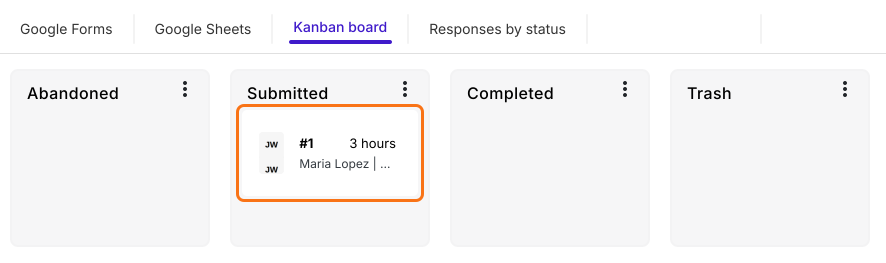
- Select Kanban board > Click on the response in Submitted to view the details.
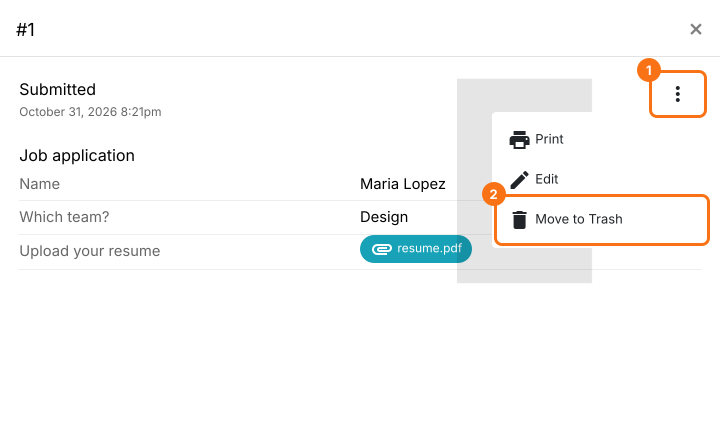
- Click on the ⋮ icon and click on Move to Trash.
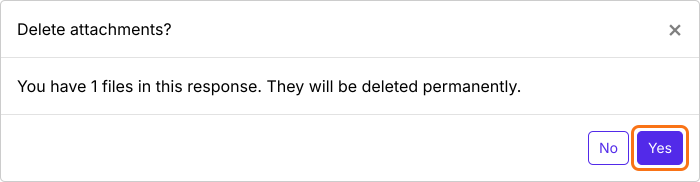
- In the Delete attachments? popup, click Yes to permanently delete the uploaded files.
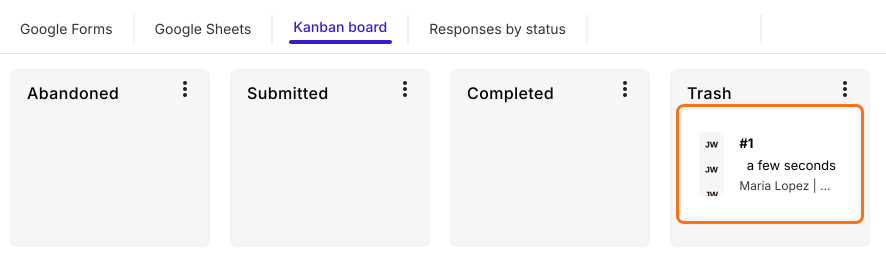
The response will be moved to Trash and the uploaded files will be deleted. Instead of a link to the uploaded file, only the file name will be displayed as a response for that file upload question.
Summary
Deleting a response in Google Forms leaves its uploaded files behind in Drive, to be found and deleted one by one. With Formfacade, you move the response to Trash and say Yes to deleting the attachments, and its files are permanently deleted. Create your form and complete the steps above. If you have any questions, write to support.
Last updated: