How to make the file upload question mandatory?
If your form is a job application or a claim, a response without the document is no use. Google Forms can mark its upload question as required, but that question makes everyone sign in to Google first, so people without an account can't send anything at all. With Formfacade, you tick Mark this as required field on the upload question, and the form won't submit until a file is added. People do it with no Google sign-in, and each response arrives in your Google Form with a link to its file.
Let's start. Create your form and follow the steps below.
How to make the file upload question mandatory?
- On the page that opens, name your form, click Create form and click Proceed.
- If it asks "Do you want to preview this form?", click No.

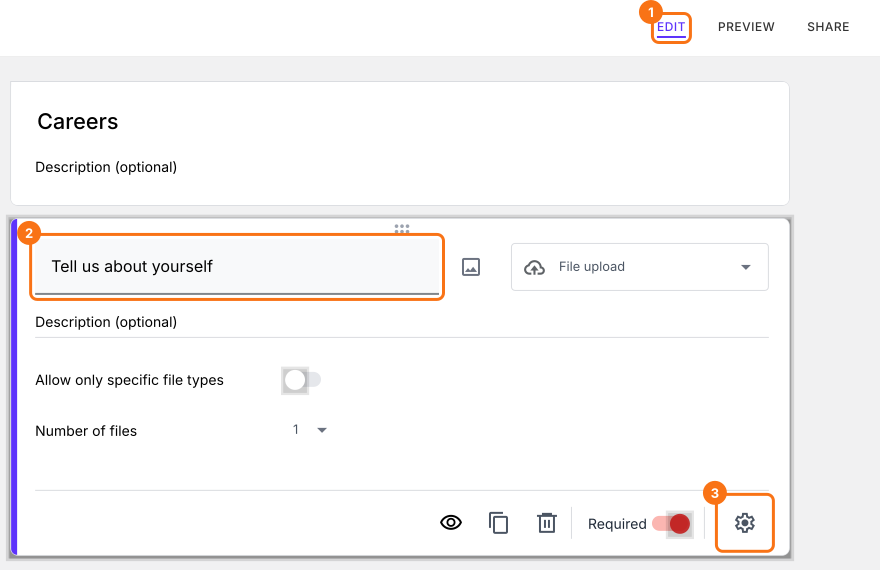
- In the Edit page, click on the file upload question, then click on the gear icon.
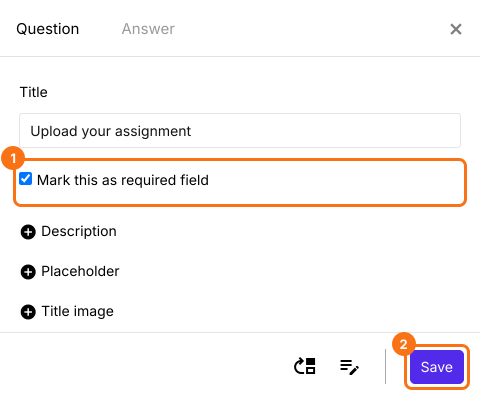
- Check Mark this as required field and click on the Save button.
Users have to upload the file before they submit the form.
Summary
When a file is the point of the form, a response without it is wasted, and Google's required upload also demands a Google sign-in. With Formfacade, you mark the upload question as required and people must add a file before they submit, with no sign-in. Create your form and complete the steps above.
Last updated: