Choose from OpenAI or Gemini (Beta)
OpenAI or Gemini: which one gives better answers on your data in Google Sheets, for the cost? Each vendor has its own tools, and moving your data to each one to find out takes time and code. With Promptrepo, you choose OpenAI or Gemini in the add-on's Advanced settings, in the same sheet, and it trains and deploys the model for you. You then call your model from your app, website or workflow.
Let's start. Open your training data in Google Sheets and follow the steps below.
Choose the model and publish
- Open Google Sheets and add or import the training dataset
- The first time, click Extensions > Add-ons > Get add-ons, search for "Promptrepo" and click Install
- Click Extensions > Promptrepo > Train AI.
- Enter the AI prompt name and click Next
- Select input columns and click Next
- Select output columns, click Advanced, select your preferred model and click Next
- Click Publish. Promptrepo fine-tunes the model.
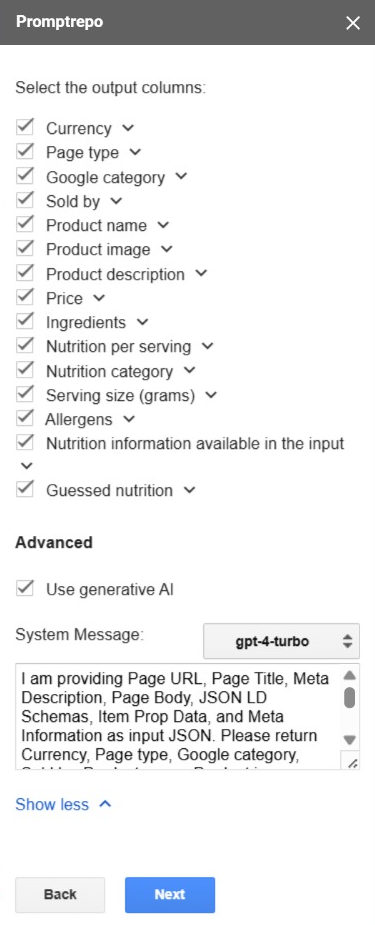
Choose your model
By default, Promptrepo uses OpenAI. You can choose OpenAI or Gemini to train and deploy your model. Choosing a model is in beta: to use it, send an email to support@promptrepo.com.
To call your model from your app, website or workflow, click CODE on your model's page and copy the code. Read Use AI - Evaluate your AI model.
Summary
If you want to balance accuracy and cost, moving your data to each vendor's own tools takes time and code. With Promptrepo, you click Train AI in Google Sheets, select your input and output columns, click Advanced to select OpenAI or Gemini and click Publish. Choosing a model is currently in beta, so send an email to support@promptrepo.com for more information. If you have any questions, write to support.
Last updated: