How to look up data from Google Sheets in Google Forms?
"Show individual students their results by entering roll number"- Google Docs Editors Community
Someone enters a roll number, an order number or a coupon code, and the form should find the matching value in your Google Sheet: their marks, the order's status, the discount. 25 people on Google's forum have asked for exactly this. Google Forms can't read a Sheet while someone is filling it in, and Apps Script only runs after they submit. With Formfacade, you connect your sheet and describe the lookup in plain English, and the value appears as soon as they answer. You can show it, hide it or make it read only, and it is recorded with the response.
Below is what a lookup is, why Apps Script can't do it, and how to set one up with Formfacade.
What is a Lookup in Google Forms?
A lookup connects a question in your form to a column in your Google Sheet. When a respondent selects or enters an answer, the form queries your sheet in real time and returns a related value based on that selection.
For example, when a respondent enters a coupon code, the form can look up and return the applicable discount from your sheet. Or, if a respondent selects a student name from a dropdown, the form can look up and return that student's email address from your sheet. The email address is recorded as an answer for the email address field in the form. You can choose to hide this field so respondents do not see it while completing the form.
This is different from populating a dropdown, where the sheet is only used to supply the list of options. A lookup happens after the respondent makes a selection or enters a value and returns data from your sheet based on what they chose.
Can I use Apps Script?
Apps Script can be used to edit a form or trigger actions after a respondent submits the form. For example, it can look up a sheet to update answer choices in a dropdown or send a confirmation email to the respondent. However, Apps Script cannot respond to a respondent's input in real time within a native Google Form.
A lookup requires the form to query your sheet the moment a respondent makes a selection or enters a value and Apps Script has no way to do this while the respondent is filling out the form.
Import Google Forms via URL
If you have already created your form in Google Forms, you can use the form URL to import it to Formfacade. This creates a copy of your form in Formfacade where you can configure the lookup. When respondents submit the form using the Formfacade link, responses are recorded in Google Forms. You can use the Link to Sheets feature in Google Forms to automatically sync responses to Google Sheets in real time.
Let's take this example. A school admin form presents a dropdown of student names. When a staff member selects a name, the student's email address is automatically looked up from the sheet and recorded with the response. This eliminates manual entry errors and ensures the email address is always accurate and up to date. The email field can be hidden so the staff member does not see it while filling out the form.
How to set it up?
Your Google Form needs the question people will answer and a question for the value to look up. Your Google Sheet needs a column for each.
- Click on Connect your Google Sheet to your form
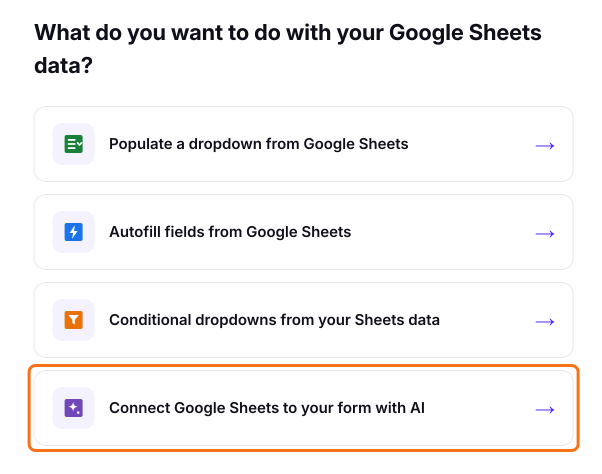
- Click on "Connect Google Sheets to your form with AI" in the page that opens
- Paste your Google Form link and click Next. Formfacade will copy your questions
- Select your sheet and click Next. If you haven't connected one yet, click Connect a Google Sheet and pick it in Google's window
- Under "How do you want to connect?", edit the instruction written for you to implement the lookup and click Proceed. For example: "When a staff member selects a student name, look up and return the email address from the Students sheet."
- Click Preview your form to try it
- Share the Formfacade link with your respondents.
Describe what you want in plain English or any language and it will query your sheet in real time when a respondent makes a selection and populate the answer with data from your sheet. The form stays in sync with your sheet automatically.
Let's take another example. A retail store uses a Google Form to take orders and support discount redemption. When a customer enters a coupon code, the form queries the sheet in real time and returns the applicable discount. If the coupon code does not exist in the sheet, the form displays an error message. For example: "When a customer enters a coupon code, look up and return the applicable discount from the Discounts sheet."
Why this approach?
- No Apps Script needed. Set up the lookup with a plain English instruction.
- Handles large data. Supports data of any size backed by Google Sheets with no performance limits.
- Flexible UI. Hide lookup fields or mark them as read-only so respondents cannot edit the returned value.
- Your sheet is the single source of truth. Update data in one place and every connected form reflects it automatically.
- Your sheet is never modified. Formfacade mirrors your data to serve forms fast and never uses write access to your sheet.
Limitations
- Requires a subscription to Formfacade - Sheets Lookup.
- Responses are recorded in Google Forms as normal, but you must use the Formfacade link instead of the native Google Forms URL to collect responses.
Frequently Asked Questions
Can I hide the looked-up value from the respondent?
Yes. You can choose to hide the field that displays the returned value. The value is still recorded with the form response but the respondent does not see it while filling out the form.
What happens if the value entered by the respondent does not exist in the sheet?
The form can display an error message to the respondent. For example, if a customer enters an invalid coupon code, the form will notify them that the code does not exist.
Can the lookup return a value from a different sheet than the one powering the dropdown?
Yes. The dropdown and the lookup can be connected to different sheets.
Does the sheet need to be in a specific format for the lookup to work?
No. As long as the lookup values are in one column and the related values are in another column, Formfacade can work with your existing sheet structure.
Are responses recorded in Google Forms?
Yes. Regardless of whether you use the import method or the add-on, responses are recorded in Google Forms as normal. You can use the Link to Sheets feature in Google Forms to sync responses to Google Sheets in real time.
Summary
When a form should find a value in your Google Sheet as someone answers, Google Forms can't do it and Apps Script runs only after they submit. With Formfacade, you connect your sheet and describe the lookup in plain English, and the value appears while they fill in the form. Connect your Google Sheet to your form with Formfacade. If you have any questions, write to support.
Last updated: