How to add readonly fields in Google Forms?
"How to greyout the prefilled information on google forms?"- Google Docs Editors Community
You prefill a form with details from your records, such as a name, an account number or the items ordered, and they have to come back exactly as you sent them. 104 people on Google's forum have asked how to grey out a prefilled answer. In Google Forms, people can change any answer you prefilled, and no setting locks a question. With Formfacade, you set a question's Appearance to Read only. People see your value as plain text they can't change, and it is recorded with the response.
Below are three ways to lock a prefilled answer in Google Forms, and where each one falls short.
3 ways to lock a prefilled answer in Google Forms
1. Response validation
For a short answer question, click ⋮ More, then Response validation. Choose Regular expression, then Matches, and enter the value you prefilled.
Where it falls short: People can still edit the answer; the form only refuses anything else. One rule serves everyone, so it can't work when each person gets their own value.
2. Put the value in the description
Write the value into the question's description, so people read it instead of answering it.
Where it falls short: It is text on the form, not an answer, so it isn't recorded with the response. Each person would need their own copy of the form.
3. Formfacade: set the Appearance to Read only
People see your value as plain text they can't change, and it is recorded with the response.
How to make a field read only?
- Click Create your form, name your form, click Create form and click Proceed.
- If the Prefill & email dialog asks "Do you want to prefill this form and send them as email to your contacts?", click No.

- On the Edit tab, click the field, then the gear icon
- Click Answer, change the Appearance to Read only and click Save
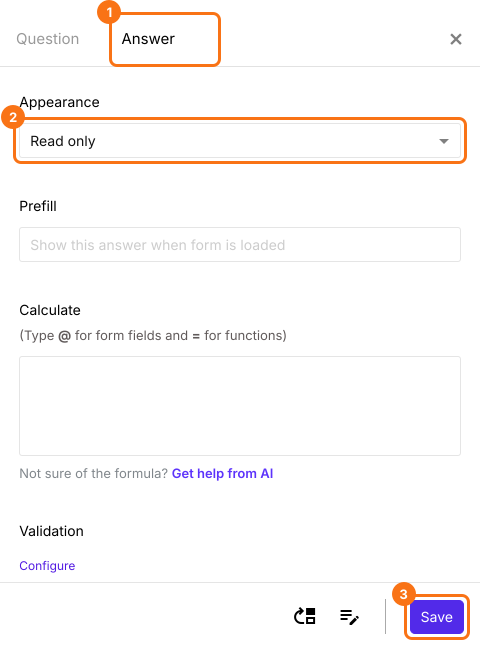
When your customer opens the prefill link, the field shows your value as plain text that they cannot change. Its value is recorded with the response. To fill in the value for each customer, read How to create a secure prefill link for Google Forms?
To keep the field off the form, change the Appearance to hidden. Read How to add hidden fields in Google Forms?
Summary
Google Forms lets people change any answer you prefilled, and no setting locks a question. With Formfacade, you set the question's Appearance to Read only, so people see your value but can't change it, and it is recorded with the response. Create your form and complete the steps above.
Last updated: