Paragraph
"How do I set a word limit for Paragraph questions on a Google Form?"- Google Docs Editors Community
Ask for a bio or a short statement and some people write one line while others write pages. 28 people on Google's forum have asked how to set a word limit on a paragraph question, and the regular expressions passed around for it don't always count right. In Formfacade you add a paragraph question and set Length validation for a maximum or minimum number of characters, or use the regular expression below for a word limit. People see your message when they go over, so they know how much to write.
Create your form and follow the steps below.
How to add a paragraph question?
- Click on Create your form, name your form, click Build form and click Proceed.
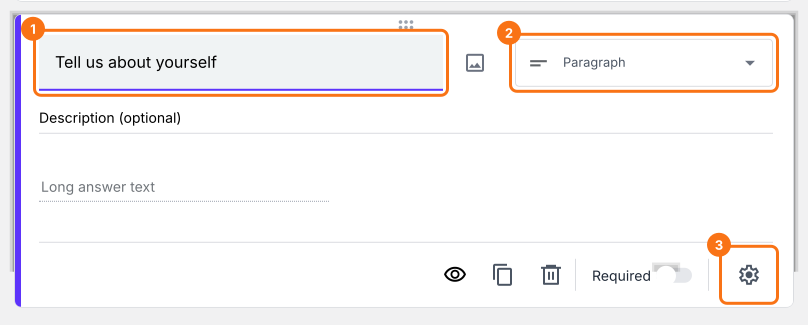
- Click on the "Edit" tab

- Click on the + icon (Add field) in the toolbar on the right and enter your question
- Select Paragraph in the question type list
- Enable Required toggle button to make this a mandatory question as shown below
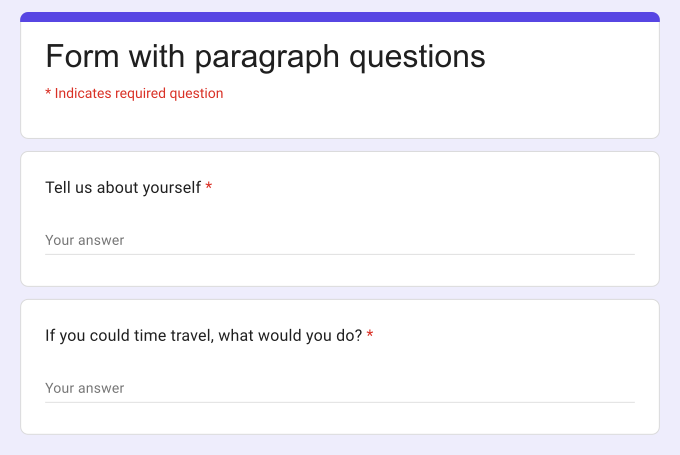
What your users see
Paragraph question allows users to write long answers with one or more paragraphs. By default, this does not have any character or word limit, but you can use the response validation option to limit responses to specified number of characters or words.
How to add a paragraph question with character limit?
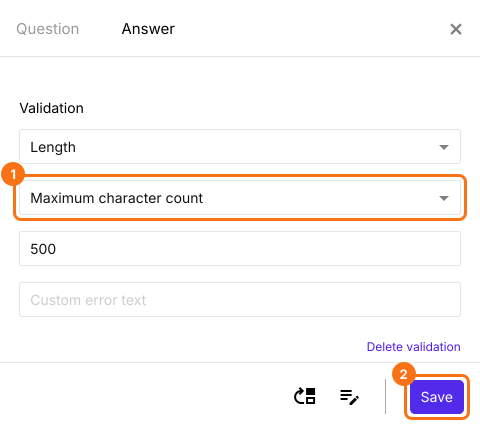
You can limit answers to a specified number of characters or require a certain number of characters by using the Length response validation.
- Click on the + icon (Add field) in the toolbar on the right
- Select Paragraph in the question type list
- Click on the ⚙️ icon at the bottom right of the question, select the "Answer" tab and click Configure under Validation
- Select Length
- Select Maximum character count
- Enter the character limit as shown below
- Click Save
Minimum character count
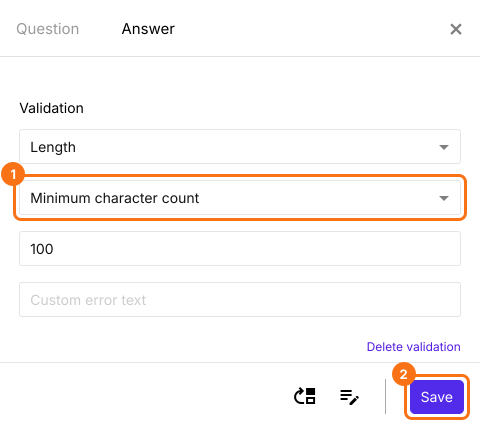
Similarly you can enforce a minimum character limit for any paragraph question.
- Click on the + icon (Add field) in the toolbar on the right
- Select Paragraph in the question type list
- Click on the ⚙️ icon at the bottom right of the question, select the "Answer" tab and click Configure under Validation
- Select Length
- Select Minimum character count
- Enter the character limit as shown below
- Click Save
How to add a paragraph question with a word limit?
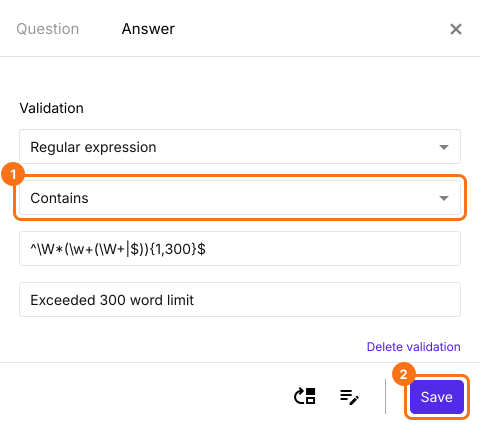
You can write a regular expression to impose a word limit on the answer. The regex can be used to enforce a max or a min word count. For example, the below regex will restrict the answer to 300 words.
^\W*(\w+(\W+|$)){1,300}$
- Click on the + icon (Add field) in the toolbar on the right
- Select Paragraph in the question type list
- Click on the ⚙️ icon at the bottom right of the question, select the "Answer" tab and click Configure under Validation
- Select Regular expression
- Select Contains
- Enter ^\W*(\w+(\W+|$)){1,300}$
- Enter a custom error message
- Click Save
Summary
If you want long answers from your users, a short answer question is too small. With the paragraph question in Formfacade, users can write one or more paragraphs and you can use response validation to limit the answers to a number of characters or words. Create your form and complete the steps above.
Last updated: