How to submit a HTML form to Google Sheets?
"I am trying to submit the HTML form data which is integrated with Google sheets"- Google Docs Editors Community
You keep your leads or your to-do list in Google Sheets, and you want the form on your website to add a row there. An HTML form can't write to a Sheet by itself. A Google Form can, for free, but it looks like a Google Form and sits in an iframe on your page. Google Apps Script can connect your own HTML form to the Sheet, but then the code is yours to write and fix. With Formfacade, your Google Form shows on your site as an HTML form without an iframe, and you can link its responses to a Google Sheet.
Below are three ways to send an HTML form's answers to Google Sheets, and where each one falls short.
Google sheets is the most flexible data base to maintain leads or to-do list. But to collect data in Google Sheets you could use a simple approach like Google Forms. Or use Google Apps Script to create a HTML form.
In this article, we will look at three options to see how to submit an HTML form to Google Sheets.
Option 1 : Build a web app using Google Apps Script
Ok. Now you have Google sheets as the target. The easiest way to connect or talk to Google Sheets is to use Google Apps Script to write your own form. If you are someone with a good knowledge about programming you can use Google Apps Script to achieve it. If you choose to go with this approach, you can refer to this article for step-by-step instructions of the above process here: https://medium.com/@dmccoy/how-to-submit-an-html-form-to-google-sheets-without-google-forms-b833952cc175
TLDR; you need to follow these 3 steps:
Step 1: Create your HTML form on your own or from Bootstrap samples here: https://getbootstrap.com/docs/4.3/components/forms/
Step 2 : Build a web app that accepts the HTML form response as POST request
- Create your spreadsheet that matches with the fields you have in your form.
- Create and setup Google Apps script. Copy paste a ready-made code that will help you with adding a new row upon every successful submit of your form.
- Authorize & setup new Apps Script project triggers for the Google Spreadsheet to listen to your form's submit.
- Publish the project as a web app. You will get a web app URL after you publish. Save it for the next step.
Step 3: Link your HTML form to Google Sheets.
Add the web app URL to your HTML Form. Also, add a piece of code to convert the form data into JSON to send it to your Google spreadsheet.
Now, your HTML form should be ready to submit the data to your Google Sheets!
Pro:
You will be able to customize it to suit your needs.
Con:
You need to maintain and troubleshoot, if you run into code related issues. Even experienced developers will have trouble getting their apps script running in their first go.
If you are not a developer, you may need a much simpler approach.
Option 2: Use Google Forms directly on your website. Connect it with a Google Sheet.
This is as simple as it gets. Your form is hosted on your website, so you have your own link to share with your users. Here is how you can embed your Google Form in your website. How to Embed Google Forms in Website?
Pro:
You don't need to be a developer. It is free and by far the simplest way.
Con:
The Google Form's standard look is not professional. What do your users think when they see a form that doesn't have your branding? Does it give them the confidence that you will be able to deliver a great product or service, when you can't even show them a professional looking form?
Enter Formfacade!
Option 3: Use Formfacade to convert your form into a HTML form
- Click on Create your form, name your form, click Build form and click Proceed.
- Click on the "Share" tab

- Click on Embed
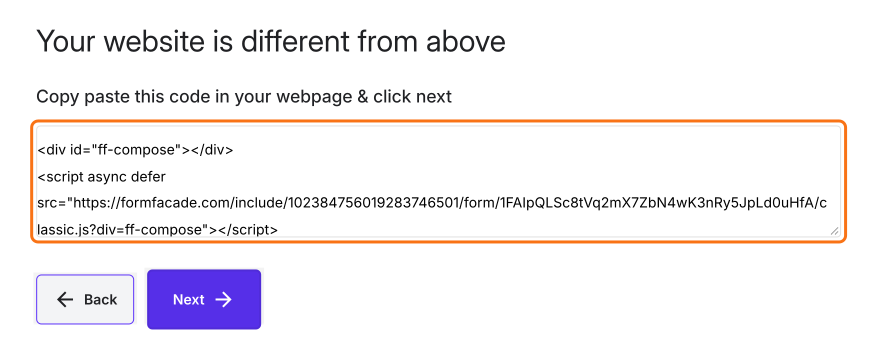
- Select "My website is different from above" and click NEXT
- Copy the code and paste it in your webpage
- Click on the "Responses" tab, then click on Google Sheets
- Click Link to Sheets, then click Proceed

Pros:
You can still be a non-programmer and can achieve building a HTML form.
Your forms will have a professional look and blends within your website. No iframe, no more Google branding.
Con:
The solution is priced at $8 per month for more than 100 responses.
Now that you have these choices, you can explore what suits you best. Find the best solution that matches your effort to benefit ratio.
Summary
If your website form has to send its answers to Google Sheets, Apps Script needs code and a plain Google Form does not look like your website. With Formfacade, you paste the embed code in your webpage and link the responses to a Google Sheet. Create your form and complete the steps above. If you have any questions, write to support.
Last updated: