How to get email notifications for new responses in Google Forms?
"Is it possible to have the form responses embedded in email notifications for Google Forms?"- Google Docs Editors Community
You want to hear about every new response to your Google Form, and you want to read it in the email. Google Forms can email you, but the email only says there's a new response and links to it, and 37 people on Google's forum have asked how to get the answers into it. Each person on your team also has to turn it on for themselves. With Formfacade, the email has the answers in it, and you send it to everyone on your team at once. You can add your own instructions to it, so your team knows what to do with each response.
Below are two ways to get an email for each new response, and where each one falls short.
1. Turn on notifications in Google Forms
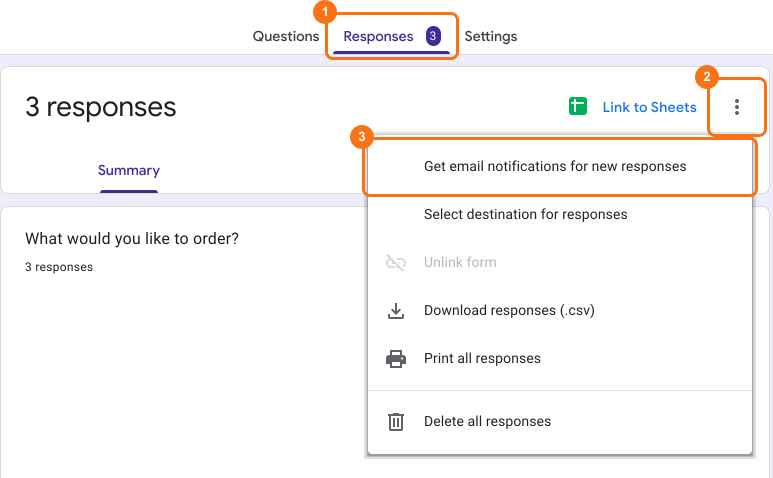
- Open your form in Google Forms and click Responses.
- Click the More ⋮ icon.
- Turn on Get email notifications for new responses.
Where it falls short
- The email has no answers in it, so you open the form to read the response.
- To tell others on your team, you add them as collaborators and each of them turns on notifications.
2. Get the answers by email with Formfacade
Below, the top email is Google's notification: a line saying there's a new response and a link to it. The bottom one is from Formfacade, with the whole response and any instructions you add.
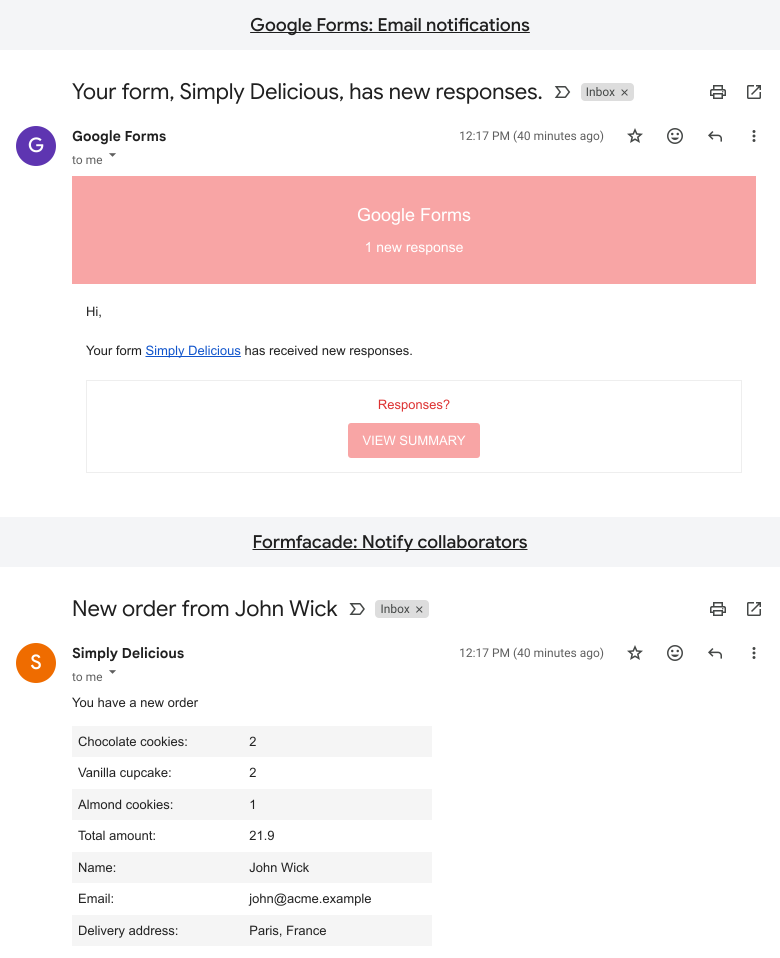
To set it up, read How to get email notifications with the form response.
Summary
Google Forms can email you about each new response, but without the answers, and each teammate has to turn it on for themselves. With Formfacade, the email shows the response and goes to everyone you list. Create your form and send it to your team.
Last updated: